The First Drill Design
Platform Built for
Real Collaboration
Stop emailing files. Start designing together. DrillWeaver brings real-time cloud collaboration, AI-assisted formation design, and instant performer access to one powerful platform — on Mac and Windows.
The Marching Band Software Industry Runs on a 20-Year-Old Workflow
Design a drill. Export a file. Email it to the director. Wait for notes. Make changes. Email it back. Repeat for weeks. Every piece of drill design software on the market treats this as acceptable. DrillWeaver doesn't.
"The marching band software industry has run on the same workflow for 20 years: design a drill, export a file, email it to the director, wait for notes, repeat. DrillWeaver ends that. Design together in real time, review in a browser, push changes instantly. The first drill design platform built for how modern band staffs actually work."
What Modern Drill Design Actually Looks Like
These are the specific gaps in existing drill design software that DrillWeaver was built to fix.
Real-Time Collaboration — Not File Swapping
Other software: export, email, wait, repeat. DrillWeaver: share a 6-character code and co-edit the same drill live. Changes propagate in under 100ms. No "which version is current?" No overwritten work. Your entire design staff in one session.
No Plug-Ins. No Surprises.
Other software charges extra for basic tools that should be included: dot books, traditional tools, floor covers, spiral tools. DrillWeaver includes everything in the base price. What you see on the pricing page is what you pay. Full stop.
No Activation Server Nightmares
Some directors report re-registering their software dozens of times in a single season and getting locked out when activation servers go down. DrillWeaver uses cloud-based activation that works even when you're offline, once validated. Your software never locks you out.
Video Export — With Audio
Other software has no native video export. Directors run a screen recorder, trim it manually, and sync audio in a separate editor. DrillWeaver exports directly to video at 480p, 720p, or 1080p with synchronized audio from your loaded song file. One click. Done.
Native Mac App — Not a Port
Other drill software on Mac has documented rendering failures, broken 3D visualization, and disappearing UI elements. DrillWeaver has a native macOS app built in SwiftUI from the ground up — not a Windows app squeezed into a compatibility layer. It works the way Mac software is supposed to work.
Staff Review Without a License
Your caption heads and percussion coordinator shouldn't need to buy a $800/year subscription just to review a drill. With DrillWeaver, any staff member can review the current drill in a browser — no software, no license, no cost. Share a link. Done.
Performer Portal Included — Free
The industry-standard performer app hasn't been updated in 9 years and crashes on current iOS. DrillWeaver's Performer Portal is included on every plan at no extra cost. Works on any phone browser. No app install. No account creation. Just open member.drillweaver.com and find your dot.
One-Time Purchase — Not an Annual Subscription
Other drill design software charges you every year just to keep using software you already paid for. DrillWeaver starts at $699 one-time. Pay once, own it — no license subscriptions, no renewal fees, no "your software stops working if you don't pay." Your license is yours until you're ready to upgrade to the next major version. The Cloud Features Pass (AI, collaboration) is the only optional add-on, starting at $250/year.*
The Complete Drill Design Platform
DrillWeaver combines powerful marching band drill design tools with modern cloud collaboration — giving you everything you need to create breathtaking formations from concept to performance day.
Real-Time Cloud Collaboration
Co-edit with your full design staff in real time. Share a 6-character code — everyone is live in the same drill in seconds. No file swapping. No version confusion. Changes propagate in under 100ms.
Visual Drill Editor
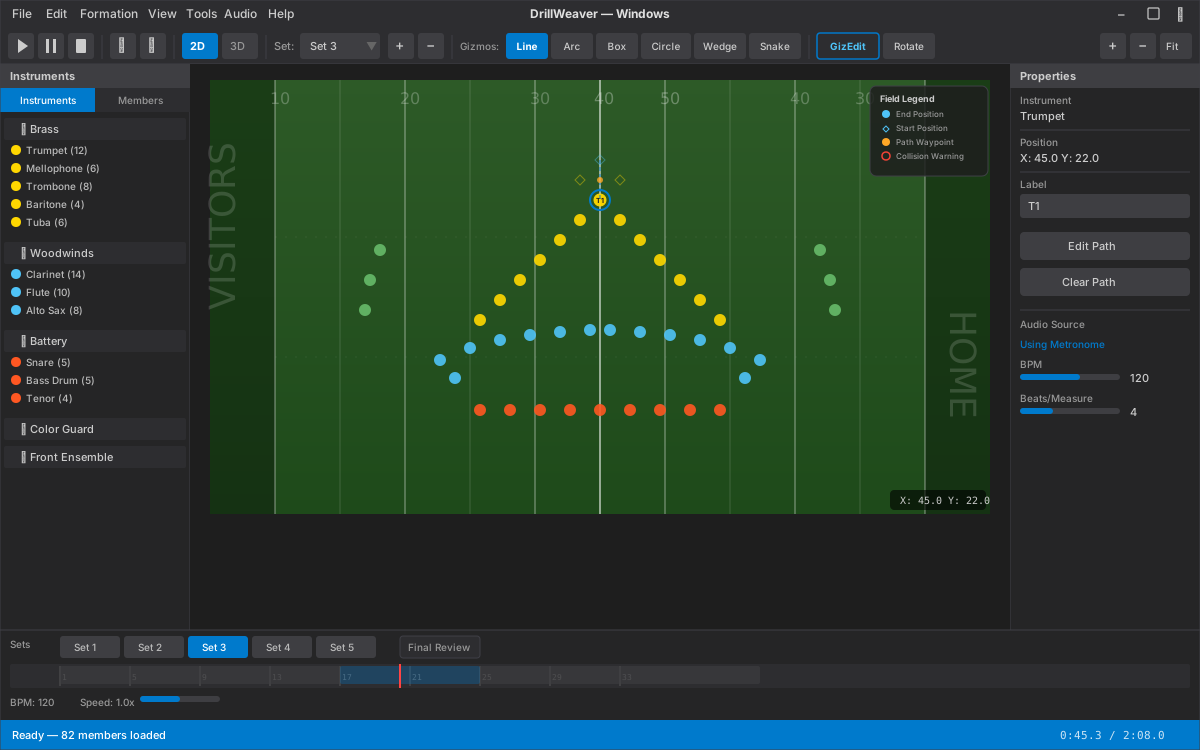
Drag-and-drop performers onto a precision 2D field canvas with grid snapping, pan, zoom, box selection, and real-time collision detection. Designed for speed.
3D Visualization
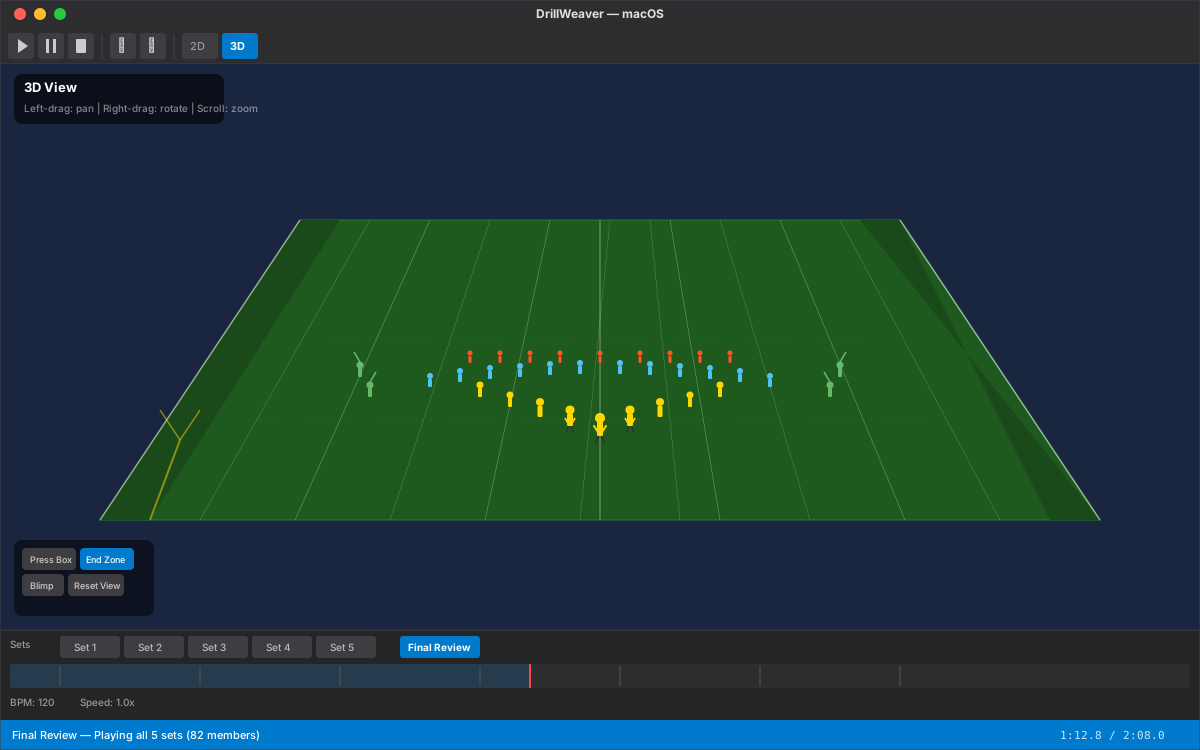
Full 3D field view with articulated member models, walk cycle animation, and camera presets — Press Box, End Zone, and Blimp/Overhead views. School logo chest decals on every uniform.
MP4 Video Export with Camera Paths
Export drill animation as MP4 at 480p, 720p, or 1080p with synchronized audio. Choose from 5 cinematic camera paths — orbit, sweep, zoom in, zoom out, or static — with picture-in-picture 2D overlay. No screen recording required.
Performer Portal — Included Free
Every performer accesses their dot book, coordinates, and animated formation view at member.drillweaver.com. Works on any phone browser. No app install. Included on all plans at no extra cost.
Print & Export
Generate print-ready field charts, individual coordinate sheets, per-performer dot books with mini-field diagrams, and formatted cast sheet rosters. Everything a band camp needs.
Everything You Need. Nothing You Don't.
Every feature was built to solve real problems that band directors and drill designers face every day. No plug-ins. No add-on fees. Included.
Real-Time Cloud Collaboration
Your full design staff works on the same drill simultaneously. The drill writer at home, the director in the gym, the percussion coordinator across town — everyone in the same session. Share a 6-character invite code. That's it.
- Changes propagate in under 100ms to every collaborator
- Caption heads review in a browser — no software license needed
- Per-set staff comments with resolution tracking
- One source of truth. No version confusion. No lost work.
- Multiple simultaneous editors so your whole design staff can co-edit at once
- Staff presence — green/red dots show who on your staff is online right now, with online and offline notifications
- Message any director on your staff directly — a tabbed, iMessage-style chat built right into the app
AI Drill Assistant — Your Creative Partner, Not Your Replacement
Directors are right to be skeptical of AI "writing their show." That's not what this is. The AI Drill Assistant handles the tedious math so you can focus on the artistry. You stay in creative control. Every formation is yours.
With our patent-pending AI technologies, DrillWeaver does what no other drill software can:
- Type a command."Spell TIGERS at midfield." "Form a block on the 40 yard line." Done.
- AI Suggest TransitionSelect two formations and the AI generates optimal movement paths — minimizing step sizes and avoiding collisions.
- AI Choreography ModeDescribe a multi-step sequence in plain English and the AI generates multiple sets with transitions between each step.
- Smart Reweave™Section-aware roster changes with preview and detailed change log before accepting. Trumpets fill trumpet holes, not saxophone holes.
- AI suggests. You decide.Every result is editable before it's applied.
✓ Centered on 40 yard line
✓ 2-step spacing applied
Review & accept or adjust
See Every Marcher's Real Position — Live, On Your Field Canvas
Stop walking the field with a clipboard yelling "back two." During rehearsal, every marcher's phone broadcasts their GPS position in real time to your DrillWeaver canvas. You see actual vs. expected position for every performer, color-coded so drift is obvious at a glance. No other drill design software has this.
- Each marcher installs the free DrillWeaver Marchers app on their iPhone or Android phone (one-time setup).
- During rehearsal, every marcher must have their phone on them — in a pocket, armband, or running belt. Many bands already use armbands for fitness tracking; the same approach works here.
- Marchers grant the app background location permission (required for the phone to keep tracking when the screen locks).
- The director starts a tracking session in DrillWeaver and every active marcher's position appears on the field canvas in seconds.
Phones don't need a SIM/cellular plan if your practice field has Wi-Fi. Tracking is best on outdoor fields where GPS has clear sky access.
With our patent-pending GPS tracking system, here is what you can do during rehearsal:
- Live position overlay.Each marcher appears as a colored dot on your 2D field canvas in real time. Green = on the mark (within 1 yard), yellow = drifting (within 3 yards), red = way off.
- Error lines back to expected position.A line connects each marcher's actual GPS position to where they're supposed to be on the current set. You instantly see who needs a correction and by how much.
- GPS accuracy rings.A dotted circle around each dot shows GPS confidence so you can distinguish "drifting" from "GPS noise."
- Field calibration profiles.Save named GPS-to-field mappings for your practice field, home field, and every away venue. Calibrate once, reuse forever. Switch fields with one click.
- Background tracking on iOS & Android.The free DrillWeaver Marchers apps keep tracking even when a phone screen locks — no app babysitting required from performers.
- Director-only view.Only authenticated directors can see live positions. Marchers send their own location and nothing else — no peer location sharing, no privacy concerns.
GPS tracking works only inside the geofenced perimeter your school defines around its approved practice or competition field. It is automatically disabled the moment a phone leaves that boundary — it cannot and does not locate a student off the field, after rehearsal, at home, or anywhere beyond the approved area. Live positions are visible only to authenticated directors and staff as a rehearsal-positioning aid. This is not a child-locating, attendance, or surveillance product, and no parent, student, or third party can use it to track a child.
⬤ Trumpet 2 — on the mark
⬤ Mello 4 — 1.8 yd south
⬤ Snare 3 — on the mark
⬤ Tuba 2 — 4.2 yd west
⬤ Flag 7 — on the mark
Live updates · 1 Hz refresh
Marcher Portal — Web & Mobile, Included Free
Every performer gets access to the DrillWeaver Marcher Portal at member.drillweaver.com — a mobile-friendly web app that works on any phone, tablet, or computer. No app install. No account creation. Marchers see their dot book, count-by-count position coordinates, and animated formation view. Included on every plan. No extra cost.
MP4 Video Export with Camera Paths & Audio
Export your full drill animation directly as MP4 (H.264) at 480p, 720p, or 1080p at 30 or 60fps — no screen recorder needed. Choose from 5 cinematic camera paths: static, orbit, sweep, zoom in, or zoom out. Picture-in-picture mode overlays 2D overhead in 3D exports. Synchronized audio from your loaded song file. Included in Professional and Director's Suite.
Native Mac + Windows Apps
Design on Windows. Review on Mac. Share anywhere. DrillWeaver has a native macOS app built in SwiftUI — not a port, not a web wrapper. Other marching band software on Mac has documented rendering failures, broken 3D visualization, and disappearing UI. DrillWeaver works the way Mac software is supposed to.
3D Animated Visualization
Toggle into a full 3D field view with articulated member models featuring walk cycle animation, uniform rendering with school logo chest decals, and smooth stand-to-walk transitions. Camera presets — Press Box, End Zone, and Blimp overhead.
Split-Screen 2D + 3D
Design on the top-down canvas while watching the press-box 3D view simultaneously. Both stay perfectly in sync — move a performer, see it in 3D instantly.
6 Field & Floor Types — 4 Marching Styles
Design for College (NCAA), High School (NFHS), NFL, Indoor Arena, WGI Standard Floor, and WGI World Class Floor — each with accurate hash positions and dimensions. Corps, Military, Show/Traditional, or HBCU marching styles with correct step size calculations.
Built-In Drill Analysis Suite
Step size warnings flag unfeasible movements, collision detection highlights danger zones in real time, distance calculations show total travel, and direction change analysis catches sharp turns over 120° between sets. No separate plugin required.
Interactive Formation Gizmos + Spiral Tool
Instantly arrange members into lines, arcs, circles, blocks, wedges, diagonals, files, scatter, and spiral patterns — or spell out letters and words using built-in pixel-font rasterization. Interactive gizmos stay fully re-editable: reopen any gizmo with GizEdit to reshape it, or use the Rotate tool to spin a formation to any angle. Archimedean spirals with configurable rotations, inner/outer radius, and direction. Alignment, mirror, distribute, and proximity match tools included. No plug-in. No extra charge.
Count-to-Count Editing & Transition Effects
Insert waypoints at exact beat counts with C2C mode. Apply four transition effects — follow-the-leader, gate turn, pinwheel, and scatter. Click-to-place paths with hold beats for precise choreography.
MusicXML Import & Pyware Coordinate Migration
Import MusicXML from Finale, Sibelius, or MuseScore and your drill tempo map populates automatically from the actual score — no manual entry. Switching from Pyware? Paste coordinate sheet text directly into DrillWeaver and every performer snaps to the correct position instantly. No re-entry. No plug-in. No other drill software does either.
Version History
Every cloud save creates a restorable snapshot. Browse and restore any previous version of your project in one click. Never lose work to an accidental change or a bad decision. No other drill software offers version history.
Stagger Tool — Ripple & Wave Effects
Offset performer arrival timing to create cinematic ripple and wave effects. Choose from 5 patterns (sequential, alternating, center-out, outside-in, random) with configurable delay and group size.
Sketch & Wireframe Mode
Draw formation shapes directly on the field as visual guides, then populate them with performers in one click. Design the shape first, assign members second. Included free — Pyware charges for this as a plug-in.
Drill Feasibility Dashboard
Real-time Go/Caution/Stop traffic light indicator based on step sizes, collisions, and direction changes. Sortable performer table, heat map overlay, and CSV export. Auto-refreshes as you design.
One-Click Audio Sync with Waveform
Load your audio file and DrillWeaver auto-detects beats and displays a scrollable waveform. One click aligns set boundaries to downbeats — no manual count entry.
Variable Tempo & Tempo Map
Set per-measure tempo changes so accelerandos and ritardandos live inside the drill itself — not one flat BPM. The count ruler and animation playback follow every tempo shift, so what you preview matches exactly what the ensemble marches.
Multi-Language Support (EN/ES/FR)
Full interface localization in English, Spanish, and French. The only drill design software available in multiple languages.
Social Sharing
Share your drill directly to Facebook, X (Twitter), or copy a shareable link — all from within DrillWeaver. Auto-generated captions with your school name and show title.
Z-Axis / Elevation Support
Position performers and props at different heights for platforms, risers, and lifts. Per-set elevation control with full 2D and 3D visualization. Essential for indoor shows and guard choreography.
AI Show Concept Generator
Describe your show idea and the AI generates a creative concept with formation descriptions, transition ideas, and musical cues. Plan an entire show in minutes.
AI Drill Chart Image Import
Upload photos of printed drill charts from any software. AI vision detects performer positions and converts them to coordinates automatically. The fastest migration path available.
Ensemble Templates & Area Fill
Start with 7 pre-built ensemble presets (40-150 members). Fill custom areas with Grid, Random, Perimeter, or Concentric patterns. Copy sets between project files. Equipment changes mid-show for guard.
Stadium Environments & Multi-Monitor 3D
3D stadium bleachers match your field type (HS/College/NFL/Indoor). Pop out the 3D view to a second monitor while designing on the primary. Both stay in sync.
Built for the Marching Arts Community
From high school bands to DCI corps, DrillWeaver supports every ensemble type — winds, percussion, color guard, front ensemble, and drum majors.
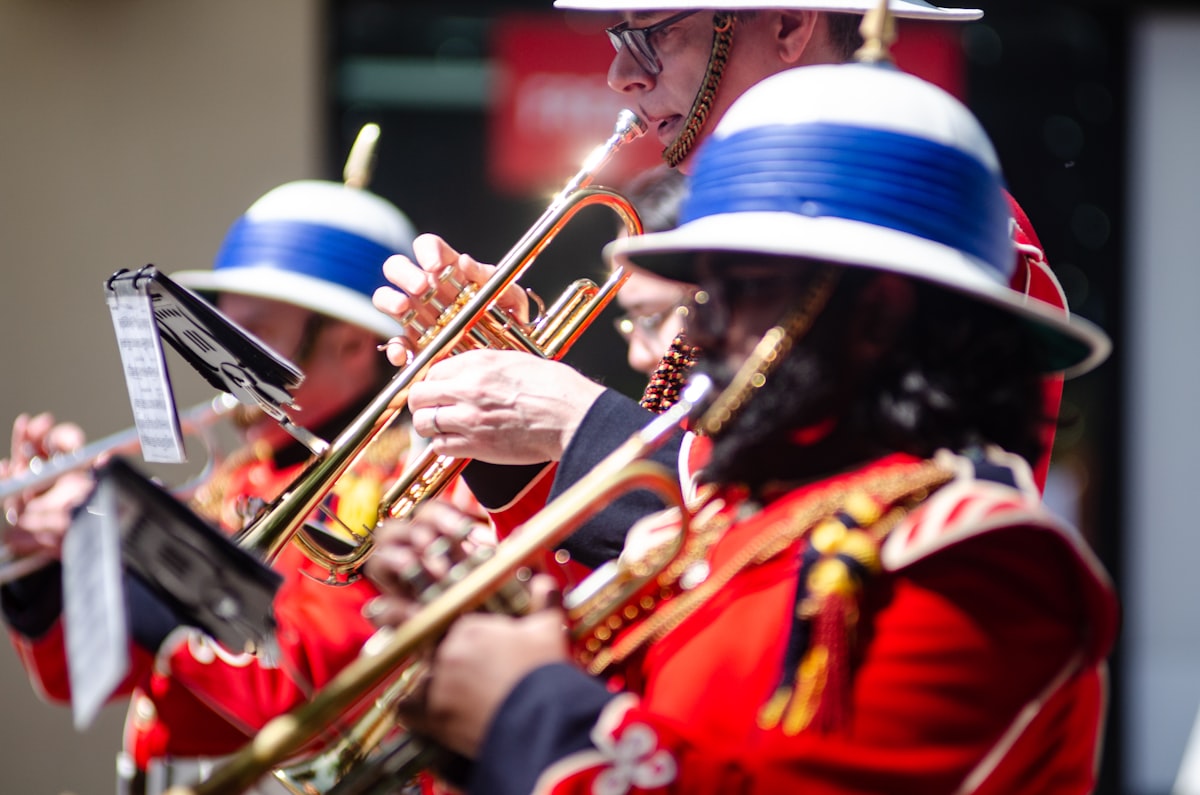
Built by a Band Director.
For Band Directors.
Twenty years on the sideline. Every piece of drill design software on the market tested and rejected. A legal pad and pencil that somehow beat them all. And one summer that changed everything.
Fed Up With the Status Quo
Laggy interfaces, six-week summers lost to software that fought back, annual subscriptions that climbed every year, and support teams that responded three days later with a link to a PDF from 2009.
One Late-Night Realization
What if you could just tell the software what you want? "Pinwheel on the 45, starts beat 16." The AI era had arrived — it just hadn't reached drill design yet. That changed the night DrillWeaver was born.
A Summer That Finally Felt Different
Six-to-eight weeks of drill building collapsed to under two. Performers had their dot books before band camp started. The assistant director in another city joined a session in thirty seconds. No emails. No crashes. No paper.
Buy Once. Use Forever.
DrillWeaver is a perpetual license — pay once and own it. No license subscriptions, no renewals, no annual fees. Your license never expires. Other marching band software charges you every year just to keep using software you already paid for. DrillWeaver starts at $499 one-time.
All plans are per-school licenses. Every DrillWeaver license is issued to a school, organization, or band program — one purchase covers your director, staff, and all of your marchers. DrillWeaver is not sold for personal or family use.
Special Pricing for Music Education Students
Studying music education, music performance, or performing arts at a college or university? We offer special academic pricing to help future band directors learn professional drill design tools. Contact us to learn about our student program — or start your free 14-day trial today.
Common Questions
Straight answers to what band directors actually ask.
Is this a Pyware replacement?
Yes. DrillWeaver is a complete replacement for Pyware 3D and other drill design software. It has a better collaboration workflow, a native Mac app that actually works, no plug-in fees, and no annual subscription. DrillWeaver also adds features that no competitor offers: real-time cloud collaboration, an AI Drill Assistant, native video export with audio, and a free performer portal included on every plan.
Will AI write my whole show?
No — and it shouldn't. The AI Drill Assistant handles the tedious math so you focus on the artistry. AI Choreography Mode can generate multi-step sequences from a plain English description — "enter in a block, expand to a V, contract to a diamond" — producing multiple sets with transitions. AI Suggest Transition optimizes movement paths between any two formations, minimizing step sizes and avoiding collisions. Smart Reweave handles roster changes with section awareness, ensuring trumpets fill trumpet holes, not saxophone holes, with a preview and change log before accepting. You stay in creative control at every step. The AI suggests and executes; you direct and approve. Every formation is yours.
Do performers need to buy an app?
No. The Performer Portal is included on every DrillWeaver plan at no extra cost. Performers access their dot book, count-by-count coordinates, and animated formation view at member.drillweaver.com on any phone, tablet, or computer. Nothing to install. Nothing to update. Works on iOS, Android, Chromebook — any device with a browser. The industry-standard performer app hasn't been updated in years and crashes on current iOS. DrillWeaver's portal is maintained and current.
What's the difference between the base license and the Cloud Pass?
The base license (Standard, Professional, or Director's Suite) is a one-time purchase that includes all core drill design features: 2D editor, formation tools, print/export, and performer portal. Professional and Director's Suite add 3D visualization, video export, and expanded team sizes. The Cloud Pass ($250/year, optional) adds AI Drill Assistant, real-time multi-user collaboration, version history, attendance tracking & reports, and community browser access. Cancel the pass anytime — your base license is unaffected and works forever.
Does DrillWeaver work on Mac?
Yes. DrillWeaver has a native macOS app built in SwiftUI — not a web wrapper or ported Windows app. It runs natively on Apple Silicon and Intel Macs with full feature parity. Other drill design software has documented Mac rendering issues, broken 3D visualization, and disappearing UI elements. DrillWeaver's Mac app is built from the ground up for macOS and works the way Mac software should.
How does real-time collaboration work?
Share a 6-character invite code with any staff member. They open DrillWeaver, enter the code, and they're instantly co-editing the same drill with you in real time. Every change propagates in under 100ms. No emailing files back and forth. No "which version is current?" No accidentally overwriting someone's work. Caption heads and percussion coordinators can review the drill in a browser without a software license. Requires the Cloud Features Pass.
What print formats does DrillWeaver support?
DrillWeaver generates field charts (one page per set, all member positions labeled), coordinate sheets (yard-line notation per performer), individual dot books (mini field diagrams per performer with their position highlighted), and cast sheets (formatted roster by section). All are print-ready PDFs. Field charts and coordinate sheets are included in Standard; dot books and cast sheets in Professional and above.
Is there a free trial?
Yes. DrillWeaver offers a free 14-day trial with full access to all features. No credit card required. Download, install, and start designing immediately. If you don't love it, you don't owe anything.
More questions? Email our team — we respond same day.